Hello World!
So after abandoning my CS degree for the past 10 years, I figured I would get a bit up to speed on what the cool kids are doing these days. Here's what I looked at this summer.
PYTHON
The first step was to decide which "new" programming language to learn. I went on Github and looked at which languages had the largest number of repositories. This helped me narrow it down to Python and Ruby though there was a ton of other languages I've never heard of like Haskell / GO / Swift etc. I briefly tried out both, then chose Python mostly because of IPython/Pandas (see below) and because animals are cooler than jewelery.
But it doesn't end there.
Since everything is done via the web now and no one mails installation discs anymore (remember formatting those AOL floppies?), you now need to decide on a web framework for your language as well. Python for example has Django, Flask, Bottle, Pyramid along with some other smaller ones. I picked Django simply because it was the biggest. After that, you need to pick a database which is typically between SQLite or a relational DB like PostgreSQL or MySQL. I went with SQLite since it was the easiest to start with (your DB is a simple file) but then bumped into issues when deploying to Heroku as they have an "ephemeral filesystem" so I had to rebuild the DB in Postgres.
So have fun deciding between the 30+ different combinations possible and then hoping you don't have to change your mind later on.
IPYTHON
A big reason why I decided to go the Python route was because of IPython notebook/pandas library. IPython (now Jupyter) provides a way to run live JUlia/PYthon/R code in a notebook cell by cell (similar to Matlab) which makes it great for building things and playing around with data. Numpy and Pandas provide a great analytic library along with some pretty neat data manipulation tools (sequencing data, merging data with holes/NaNs in your dataset etc). For example, this is one of the notebooks I made to look at YTD Returns on a selection of stocks:
%matplotlib inline
import numpy as np
import pandas as pd
import datetime as dt
import matplotlib.pyplot as plt
import pandas.io.data as web

from pandas.tseries.holiday import USFederalHolidayCalendar
from pandas.tseries.offsets import CustomBusinessDay, CustomBusinessMonthBegin
today = dt.date.today()
bday_us = CustomBusinessDay(calendar=USFederalHolidayCalendar())
last_bd = today - bday_us
start_year = today.replace(month=1, day=1)
ticker_list = {'MSFT': 'Microsoft',
               'AAPL': 'Apple',
               'AMZN': 'Amazon',
               'GOOG': 'Google',
               'BABA': 'Alibaba',
               'YHOO': 'Yahoo'}

price_change = {}
for ticker in ticker_list:
    prices = web.DataReader(ticker, 'yahoo', start_year, last_bd)
    closing_prices = prices['Adj Close']
    change = 100 * (closing_prices[-1] - closing_prices[0]) / closing_prices[0]
    name = ticker_list[ticker]
    price_change[name] = change

pc = pd.Series(price_change)
pc.sort_values(inplace=True)
pc.plot(kind='bar', title='YTD Return (%)')
plt.ylabel('Pct Change (%)')

DEVELOPMENT / DEPLOYMENT
I decided to develop locally on my Windows laptop. While it was ok to try things out, I wasted a lot of time downloading separate builds or setting PATH variables etc just to get things to work. When the instructions simply say "pip install X", you may end up having to do 5 extra steps for Windows users. As for my editor, I went with Sublime which I like very much though I did miss the dog icon in my old Crimson Editor.
GIT is another "new" thing that I completely missed in the past 10 years. It is basically a version control system that everyone seems to be using for code development today. This xkcd comic summarizes how I feel about git.
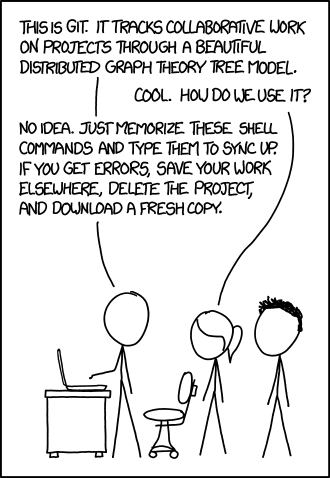
I basically read a handbook, memorized 5 shell commands (git init/clone/add/commit/remote) and treat Github as a free ftp server to store my code as opposed to actual version control. Maybe one day I will figure out how to use it properly.
For deployment, I used heroku. Python Anywhere was another free option but it only supports python whereas heroku supports other languages.
WEBSITE / BLOGGING
I've always wanted to keep a journal but I never took the time to do it. After trying out-of-the-box offerings like Wordpress / Tumblr, I decided to go for the full customization route and build my own. I needed a programming project for Python anyway.
I first started with Django which generates dynamic web sites (html on the fly). I used the official Django tutorial which is quite good. I never learned HTML / CSS before but with resources like Bootstrap / Stack Overflow, it was pretty easy to hack something together quickly. As the website progressed, I found this to be cumbersome as a blogging platform so I turned it into a travel journal instead and deployed it to Heroku here.
For a written blog, I decided to use a static html generator called Pelican which pre-generates the html so pages load faster. You simply create a Markdown document and can easily embed basically any content (even ipython notebooks!) via liquidtags. Pelican then magically creates the html pages which I used Github pages to host. You are looking at the result of that now.
So that's a quick summary of my programming adventure and the tools I've used along the way. Now here's hoping I continue updating this blog and don't just drop it after a month!